
Yesterday we announced the Rust rewrite of Verifpal. Today we’re shipping something that the rewrite made possible: Verifpal Workbench, a browser-based environment where you can write, verify, and visualize cryptographic protocol models — with nothing to install.
The entire Verifpal verification engine now compiles to a 350 KB WebAssembly binary. Open a browser tab, write a model, click Verify. The analysis runs client-side on your machine. No server, no upload, no account.
Why a Browser Tool?
Verifpal was designed to make formal verification accessible to engineers and students who don’t have a background in formal methods. But “accessible” has always meant “download a binary and learn the command line” — which is still a barrier, especially in a classroom setting.
We’ve wanted to fix this for years. The old Go codebase used cgo indirectly through several dependencies and relied on OS-specific terminal handling, making a clean WASM compilation impractical. The Rust rewrite — pure Rust with no C/FFI, no system calls in the core engine — made WASM a natural target.
Verification and Analysis
The screenshot below shows the Workbench analyzing a simplified model of the Signal Protocol. The left panel is the editor with syntax highlighting — keywords like principal and attacker in bold, primitives like HASH, HKDF, AEAD_ENC in green, query types in red, and message arrows in amber. The right panel shows the verification results: confidentiality? m1 passes, but authentication? Alice -> Bob: e1 fails — the active attacker can forge the encrypted message.
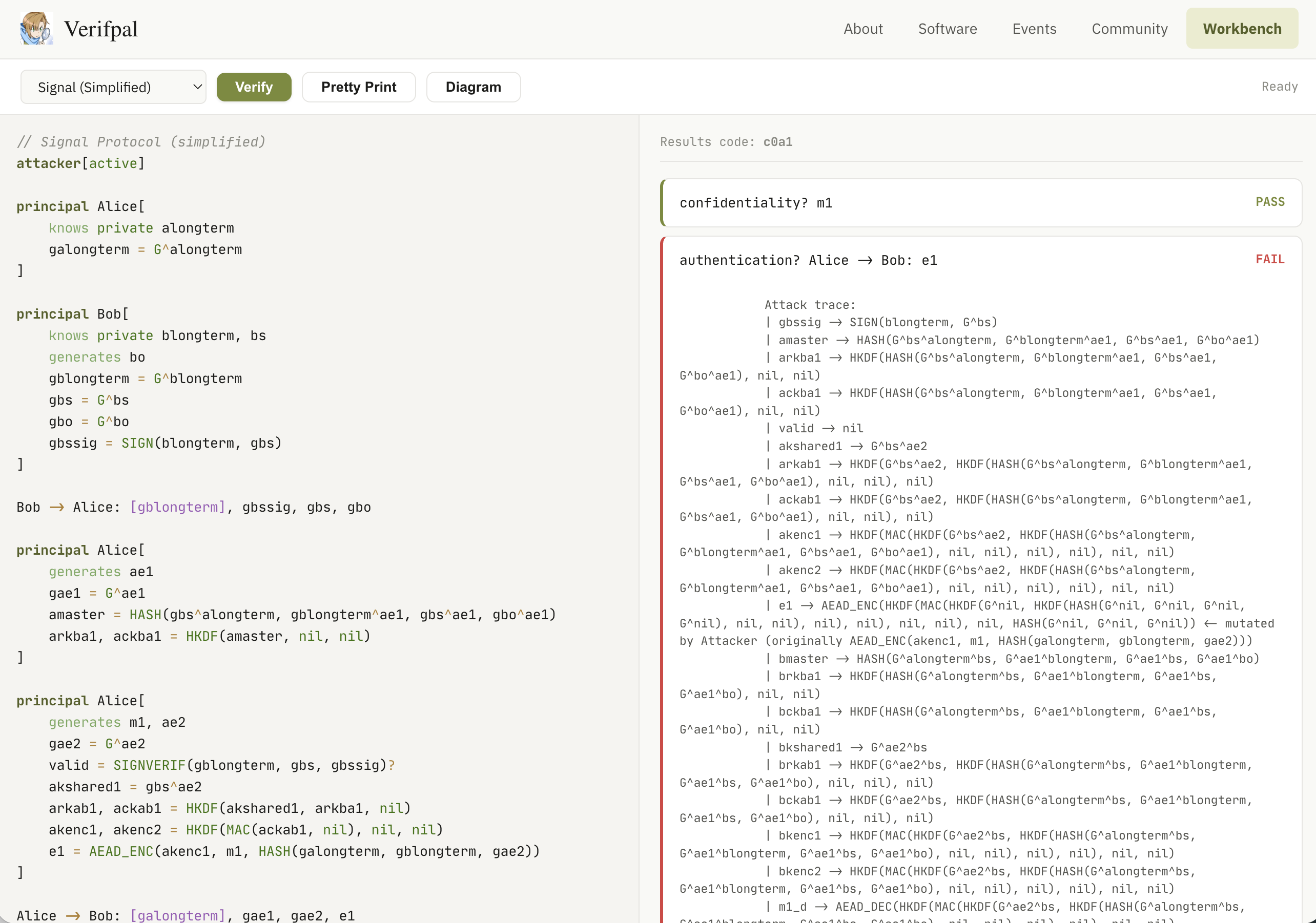
Below the failed query, the Workbench displays the full attack trace — the same output you’d see on the command line, showing exactly how the attacker mutates values, which keys they derive, and how they reconstruct the forged ciphertext. This is the Signal model running under a phase[1] key compromise scenario where both Alice and Bob leak their long-term private keys, so the authentication failure is expected: forward secrecy protects message confidentiality after key compromise, but not authentication.
Protocol Diagrams
Click “Diagram” to generate an SVG sequence diagram directly from the model text. The diagram below shows the same Signal model visualized as a message sequence chart: Alice and Bob’s computation blocks appear as annotation boxes on their lifelines, message arrows show the transmitted constants, and phase boundaries are marked with dashed red lines.
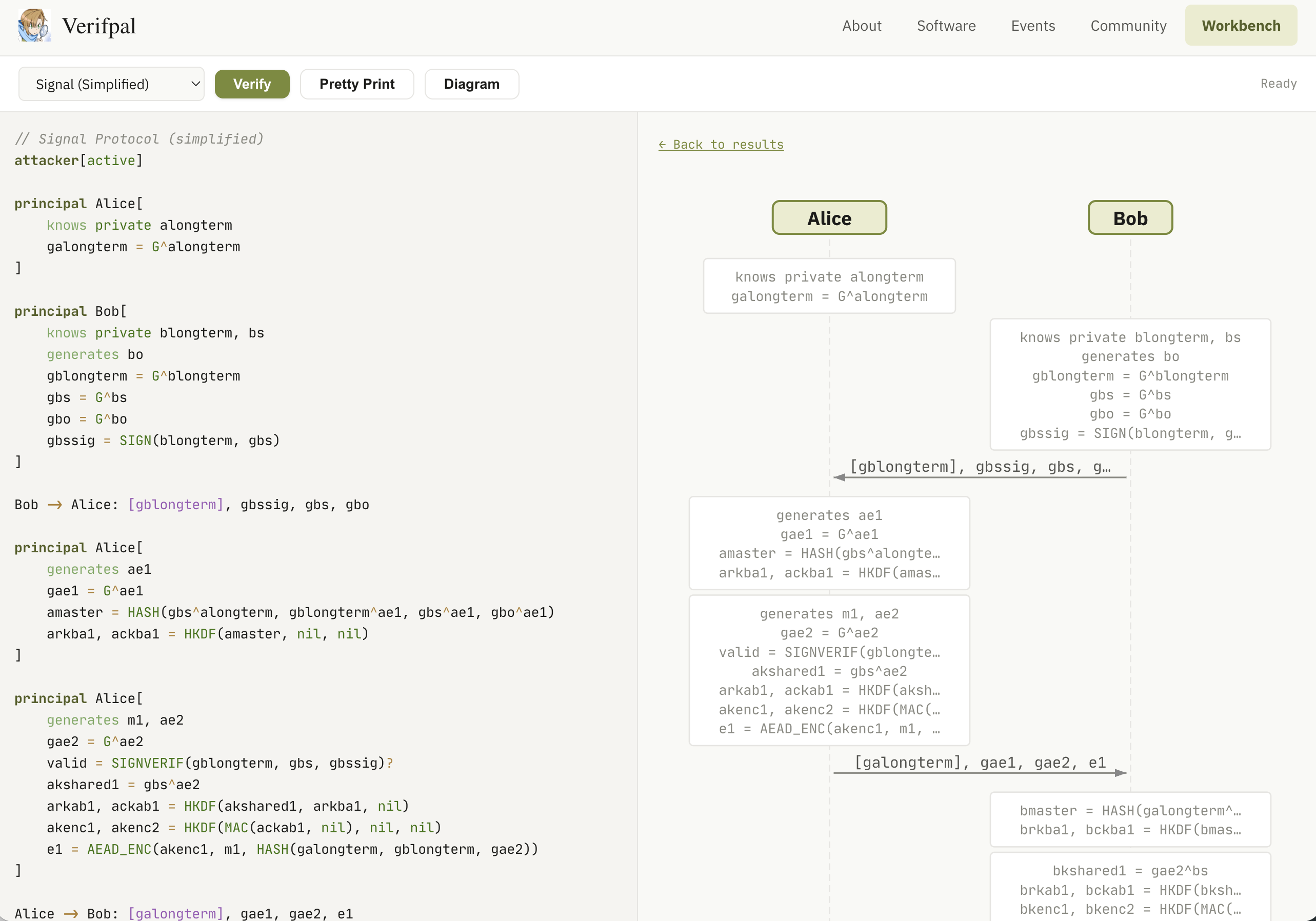
The diagrams are generated entirely client-side by parsing the Verifpal model text in JavaScript — no server round-trip, no external library. They render as inline SVG, so they scale cleanly and can be right-clicked and saved for use in papers or presentations.
Built-in Examples
The dropdown menu includes twelve example models covering a range of protocol patterns:
- Simple DH Exchange — basic Diffie-Hellman with AEAD
- Challenge-Response — nonce-based authentication with signatures
- Signal Protocol — simplified X3DH + Double Ratchet with forward secrecy
- Needham-Schroeder — classic symmetric-key protocol with known attacks
- Blind Signature — BLIND/UNBLIND protocol
- Double Ratchet — DH ratchet with symmetric chain keys
- Salt Channel — ephemeral DH + signed key exchange
- And five more covering PKE, Shamir secret sharing, digital signatures, and AEAD variants
Each example can be verified in the browser in under a second for simple models, or a few seconds for complex ones like Signal.
How It Works
The Workbench is a single HTML page that loads the Verifpal WASM module. The architecture is straightforward:
Rust side. The crate exposes two #[wasm_bindgen] entry points: wasm_verify(input) and wasm_pretty(input). Each call resets all global state (principal names, value IDs, attacker knowledge, analysis counters), parses the model from source text, runs the full verification pipeline, and returns a JSON response with results and captured analysis messages.
#[wasm_bindgen]
pub fn wasm_verify(input: &str) -> String {
    wasm_reset_all_state();
    let m = match parser::parse_string("workbench.vp", input) {
        Ok(m) => m,
        Err(e) => return json_error(&e),
    };
    // ... sanity check, init results, run verification ...
    json_results(&results, &code, &messages)
}
Feature gating. The cli feature (clap, colored, rayon) and the wasm feature (wasm-bindgen) are mutually exclusive. Rayon parallelism is replaced with sequential execution in the WASM build. The TUI, terminal color output, and OS-dependent code (tput, open, thread::sleep) are compiled out. Analysis progress messages are captured into a buffer instead of printed to stdout.
JavaScript side. The page includes a syntax-highlighted code editor (custom tokenizer — no external library), a results panel showing pass/fail for each query with attack traces, and an SVG protocol diagram generator that parses the model text client-side.
Try It
Open verifpal.com/workbench, pick an example from the dropdown, and click Verify. Or write your own model from scratch — the Verifpal User Manual documents the full language.
The Workbench is open source as part of the Verifpal project, licensed under GPLv3. The source is available on GitHub.